As a designer you must be more than an artist. You must be more than a creator. You must be part philosopher, part scientist,  part teacher, and, yes, part salesman as well. Your idea needs a champion. It needs someone to protect it, defend it, promote and explain it. The most important moment of your idea’s life will be moment you first share it with someone else. Will you just blurt it out? Will you throw it into the world naked and defenseless? Or will you take care to arrange a proper introduction and walk your audience through the steps you took. Even if the idea came to you in a flash of insight, you should never assume it will be obvious to others. You should build your argument carefully.

In this video, the famous designer Saul Bass introduces a new brand identity to Bell System (now mostly AT&T) back in 1969. Watch how he builds his argument and justifies each design element. Notice how he stops and addresses unspoken but obvious objections. When you present a new design to a client think about this video. Remember that you design will be as important to your client as their own face. Because it is their face. If you are going to change it, you need to appear confident, certain, and thoughtful about each part of your design. Well done Saul. I can see why your firm won the work.


Saul Bass introduces the new logo for Bell System

Offering a free trial of your site is great. But if users like me are any indication, we sign up, click around and never come back. Here is a behavioral change Idea I wrote down in a file April 15, 2002 that I just came across that I thought was still interesting.

  • If it really takes 30 days to begin a new habit. Then if you build good sites that offers a 30 day free trial, you should tell the users they have to log in every day or else the free trial expires.

That’s still a good idea! If you knew you would lose it, you mght be more likely to use it.
I thought I better post this to the web since I’m not likely to open ten year old files everyday.

The other idea in the file is more lame only because is so very obvious. (What was ten-years-younger Ben thinking?)

  • Appeal to influencer teens – the teens that all others want to be like. Marketing lifestyles, aspirations, sex.


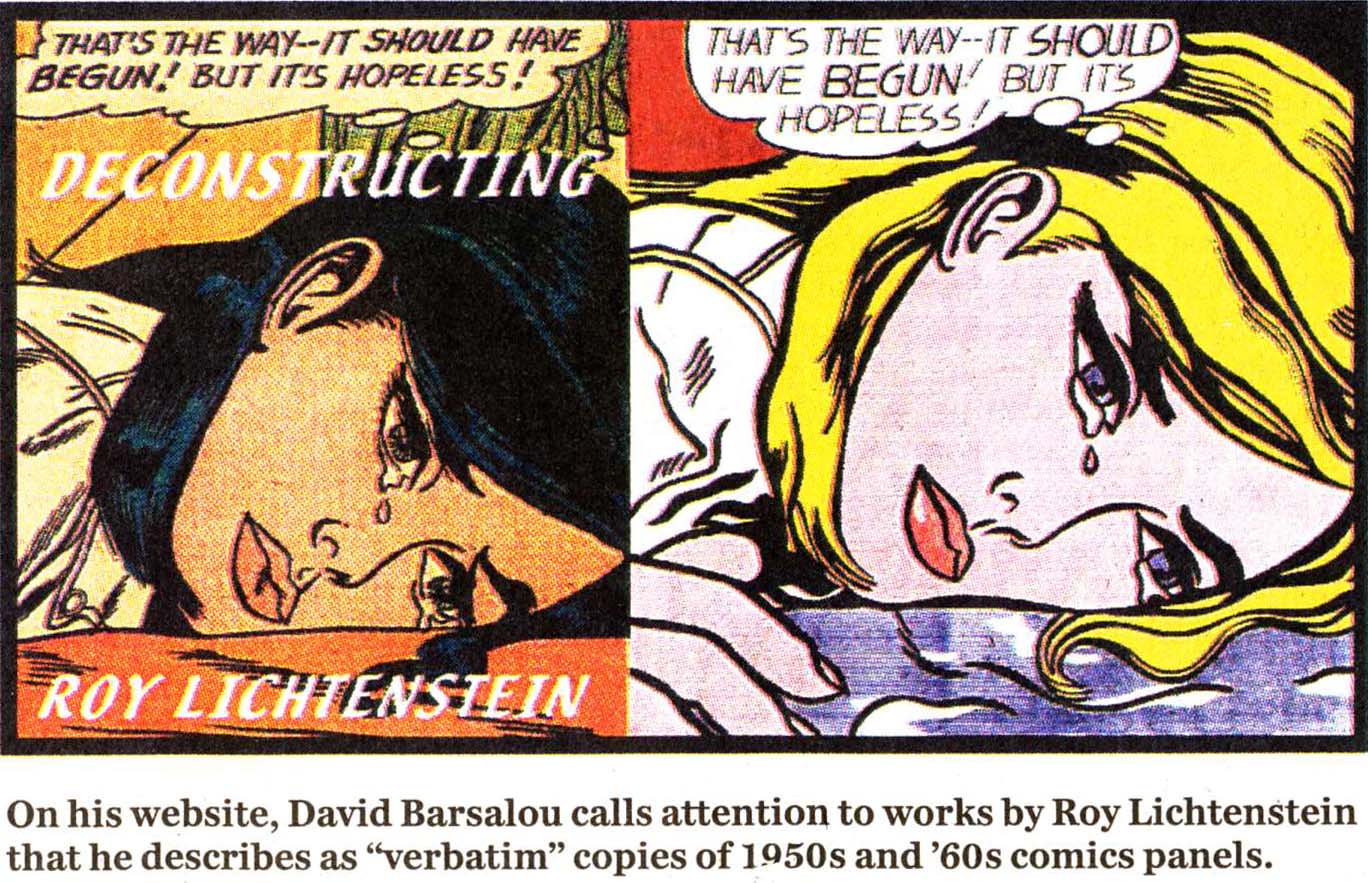
“Good artists copy, Great artists steal” It means you may not be the first to try something, but you did it so well that everyone thinks of you when they see that style. Like Picasso, Liechtenstein, Monet, Van Gogh…they may have started out coping someone else, but in the end they completely stole it. When someone becomes “great” that style is now so closely associated with them that when anyone sees it they will assume its from them.

Where does it come from?
The quote is this form was a favorite of Steve Jobs but he but he was probably (mis)quoting Pablo Picasso who said “Lesser artists borrow; great artists steal” – who in turn might be rephrasing Igor Stravinsky, but both sayings may well originate in T. S. Eliot’s dictum: “Immature poets imitate; mature poets steal; bad poets deface what they take, and good poets make it into something better, or at least something different. The good poet welds his theft into a whole of feeling which is unique, utterly different than that from which it is torn.” – The origins of this quote itself is an example of great artists stealing.

Why this matters?
At Base22 we have great designers. They are often tempted to “show off” their talent by creating website designs that are creative to the extreme. That’s great. But I remind them that it is also OK to follow established conventions and to “copy” by applying the best practices, principles, and patterns for usability, communication, and style. All of human culture, science and the arts have been an exercise of observing the world, including the human world, understanding it by taking it into your head, copy it, refine it, improve it.

The internet culture inspired by creative commons licenses and open source software actively encourage innovation through sharing. The patent system itself was established not to prevent copying, but to give it structure and relieve the fears of companies and individuals who would other wise keep their improvements forever to themselves for fear of losing the edge to competition. By applying for a patent, you publish the idea publicly in exchange for limited protection. Its a great system.

Dear Google,

I created a Google Ad for my wife’s bootcamp last week. I was excited and eager to show her how easy it was so she could do it more often. Well, nine days later, the ad is still not running. So I sent an email to support. Two days after that they wrote me back to say the ad was rejected. Why? Because we used “unnecessary punctuation”. Specifically the exclamation point!

I’m not mad about the policy. I’m mad it took NINE DAYS!!!! Google has some of the best javascript developers in the world (I know because they keep hiring everyone I try to hire for Base22).

But lets focus on solutions. Allow me give you the code to detect an exclamation point instantly, at the time of typing it into the ad, and thus tell the user it’s not allowed. It is ridiculous to wait nine days to find out you used an illegal character in a field.

Just put this on your input form:

<input type="text" id="yourAdText" 
    onchange="if (this.value.charAt(this.value.length-1) == '!') 
    {
    alert("Warning - adding an exclamation point (!) to your add
             will cause mysterious a NINE DAY DELAY! So we changed
             it to a period for you'); 
    this.value = this.value+'.'; 
    }" 
/>

Legal notice: I hereby release the above code into the public domain for all uses public and private, commercial and non-profit. Google developers should have no fear implementing this (or a much more robust, function driven piece of code that has ALL the restrictions.) I like to encode business rules into the tools as much as possible. In this case, if it is your policy to disallow exclamation points, that should, you know, BE COMMUNICATED in context rather than on page 543 of the FAQ.

So now it is unavoidable. Those of us that build websites have to adapt to screens that are as high resolution as print such as Apple’s Retina displays and range in size from tall and skinny iphones, to HD TVs, iPads, and a world still full of various laptop and desktop screens. Fine. Challenge accepted.

First challenge – what resolution do we use in Photoshop?

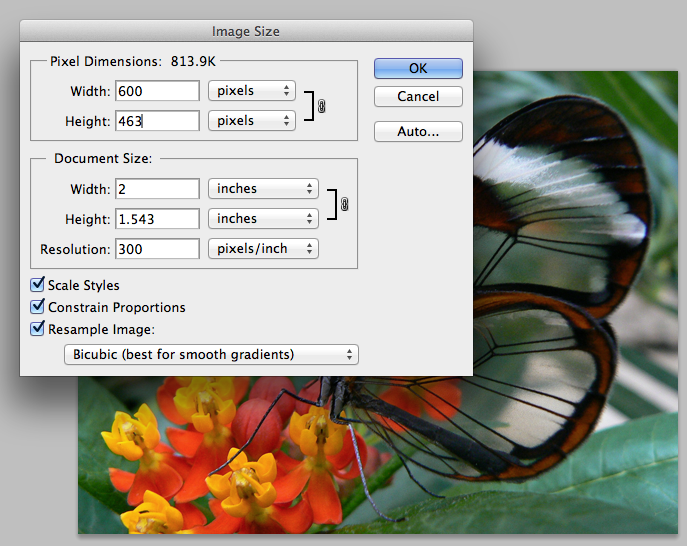
Since most designs start in photoshop – a common task is to create an new blank canvas. The only thing that matters is the number of pixels. The pixels per inch is only matters for print. It does nothing for screens. You will notice that when you save for web – pixels per inch is not an option you can tweak – BECAUSE IT DOESN’T MATTER.

But – If you want to PRINT your stuff – the set your canvas up as the same number of pixels but 300 pixels per inch. Here is an example. Notice that changing the pixels per inch only affects the “document” size (i.e. the printed size) – at 300 pixels per inch the document size is only 2 inches (again, this does not matter for ipads or any other screens)

Same image, same number of pixels, same DATA at 72 pixels per inch.

So here is a plan – if you want to print your comps and have them look good on paper – you need to set your resolution high. But when you slice this up and make a website, it will all be pixels anyway.

More tests.

Take a look at the two images below on an ipad. Both are set in the HTML to be 300 pixels wide. But behind the scenes, the left actually twice the size of the other (600 pixels wide).

HTML width 300px; Image 600px HTML and real width 300px

Theoretically, the one on the left will look better on the ipad or a high res display. If you print this document, the image on the left might also look better. But from a web perspective, they are both the same.

One more trick

If you want to get fancy you can do what Apple does on their website. They have images at double resolution (like the example above) and swap them out with javascript if they detect the user has a high resolution device.

Some more information on how to do this can be found here: